1) Download the latest Garmin official updated map from: URL: http://www.garmin.com.sg/mapupdate/
 2) Click 'Singapore/Malaysia' on 'Select the region for map update'
  3) Click 'Malsingmaps Malaysia/Singapore/Brunei NT2011.10 for '1350 Series'
4) Click 'I agree and start the download' button  5) Enter serial number of nüvi 1350 into 'Serial Number:' column and click 'Submit' button. Copy/ save the code.
6) Poweroff Garmin. Connect the device to PC via mini-USB cable. The device will initialize into USB mode  7) Install the SgMyMal_2011.10_1350.exe.
  8) Click Next
  9) Select 'I accept the terms of the license agreement' > Next >
  10) Paste the 'unlock code' from step 5 > Next >
  11) Click 'Yes'
  12) Installer updating files in nüvi 1350 devices
13) Click 'Finish'
14) Remove USB connection.
15) Restart the device.


 Select English > OK
 Click Next >
 Select 'I accept the agreement' > Next >
  Use the default for Select Destination Location > Next >
 Select Custom Polygons... > Next >
 Click Install
  Click Yes on 'Do you wish to create a gmapsupp.img?'
 Click Generate Map
 Click Yes on 'Proceed to generate gmapsupp.img with above options?'
 Click Yes.
 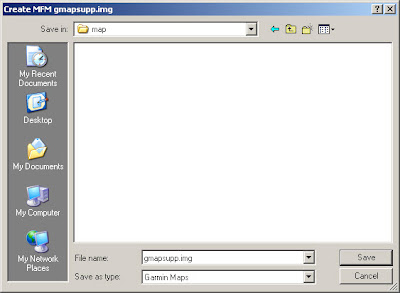 Select 'map' sub-folder on device in your pc. (Create if the folder not exist)
 Click OK
 Click Finish.


