Google

Wednesday, August 10, 2011

Horrible Bosses


Did all the phases above catch your glimpse? If YES, wait no more. Head to your favourite cinema from 11 August 2011 onwards to catch Nick Hendricks, Kurt Buckman and Dale Arbus in action.

THE TRIO’s

  • Nick Hendricks (Jason Bateman), executive @ Comnidyne Industries aiming for Vice President post

  • Dale Arbus (Charlie Day), dentist’s assistant

  • Kurt Buckman (Jason Sudeikis), accountant with Pellitt & Sons, chemical company


  • The VILLAIN’s


  • Dave Harken (Kevin Spacey), Nick psycho bos

  • Dr. Julia Harris (Jennifer Aniston), Dale meaneater bos

  • Bobby Pellitt (Colin Farrell), Kurt tool bos

  • You’ll laugh all the way on the trio plan to ‘eliminate’ their bosses from hell goes awful. Expect no twisted ending. All well end well.


    p/s: Look for wet job, murder consultant and Gregory @ Nav Guide.

    Wednesday, April 6, 2011

    Garmin nüvi 1350 Check and Activate Prefered Map


    Q: How to check your map version and activate prefered map?

    A: Touch Tools > Settings > Map
    Touch Info to view all the loaded map and version.
    Touch the box next to the map to activate or inactive the map.

    RULES: If both Garmin City Navigator Singapore/Malaysia NT and Malsingmaps Malaysia/Singapore/Brunei NT are activated, Garmin City Navigator Singapore/Malaysia NT will be set as the default map for navigation.

    Tuesday, April 5, 2011

    Official Map Update for Garmin nüvi 1350

    REMARK: Please backup waypoints and route data by copying the GPX files in the Garmin storage into your computer disk.

    1) Download the latest Garmin official updated map from: URL: http://www.garmin.com.sg/mapupdate/


    2) Click 'Singapore/Malaysia' on 'Select the region for map update' 3) Click 'Malsingmaps Malaysia/Singapore/Brunei NT2011.10 for '1350 Series'


    4) Click 'I agree and start the download' button 5) Enter serial number of nüvi 1350 into 'Serial Number:' column and click 'Submit' button. Copy/ save the code.


    6) Poweroff Garmin. Connect the device to PC via mini-USB cable. The device will initialize into USB mode 7) Install the SgMyMal_2011.10_1350.exe. 8) Click Next 9) Select 'I accept the terms of the license agreement' > Next > 10) Paste the 'unlock code' from step 5 > Next > 11) Click 'Yes' 12) Installer updating files in nüvi 1350 devices


    13) Click 'Finish'


    14) Remove USB connection.


    15) Restart the device.

    Friday, March 25, 2011

    Install Malaysia & ASEAN Free Maps (MFM) Map into Garmin nüvi 1350

    1) Download latest MFM map from:
    URL: http://www.malfreemaps.com/index.php
    Remark: Register for free to enable the thread; 'Free Public Downloads'.


    2) Poweroff Garmin. Connect the device to PC via mini-USB cable. The device will initialize into USB mode

    3) Install the MFM-Garmin-110321.exe. Select English > OK


    Click Next >


    Select 'I accept the agreement' > Next >


    Use the default for Select Destination Location > Next >


    Select Custom Polygons... > Next >


    Click Install


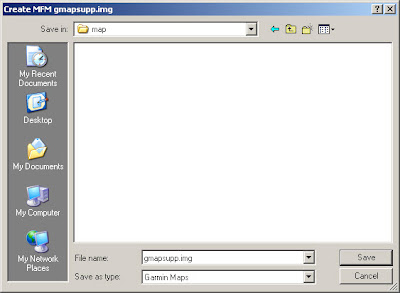
    Click Yes on 'Do you wish to create a gmapsupp.img?'


    Click Generate Map


    Click Yes on 'Proceed to generate gmapsupp.img with above options?'


    Click Yes.


    Select 'map' sub-folder on device in your pc. (Create if the folder not exist)

    Click OK

    Click Finish.

    17) Remove USB connection.

    18) Restart the device.

    Garmin nüvi 1350

    WELCOME TO GARMIN FAMILY!

    PC EXPO 2011. MVEC. 05 March 2011. RM1.00 Auction.


    1st time I participate in super intensive bidding war and eventually I emerge as WINNER. New unit of Garmin nüvi 1350 for only RM428.00. RRP is RM545.00.


    In The Box
    • Garmin nüvi 1350 GPS Receiver
    • Preloaded City Navigator Singapore/ Malaysia and MalSingmaps
    • Vehicle suction cup mount
    • Vehicle power cable
    • Dashboard disc
    • Quick start manual


    COOL’s
    • Widescreen – ultra-thin portable 4.3” display
    • Lightweight – 161.6 g / 5.7 oz
    • Junction View – real junction view guide to correct lane in complicated intersections

    • Highway Mode – all highway info
    • ecoRoute – navigation for fuel efficiency
    • External memory slot – microSD (not included)


    SUCX’s
    • NO FM Transmitter
    • NO Bluetooth
    • NO Multimedia Player
    • Box temperature above average ‘WARM’ when navigating
    • Battery life up to 4 hours – should be more


    Bottomline: Trusted navigator to guide you to destination