Google

Tuesday, July 28, 2020

HONOR Band 5: First Time Setup


WARNING: Always wipe the charging port completely dry before connecting the charging cradle.


1. Insert the protruding part of charging cradle into the charging port on the band. A click sound signal the cradle position correctly.


2. Connect the charging cable micro hdmi into the cradle and USB port to power adapter or laptop.


3. The band will be automatically power on while being charged.


REMARK: Estimated about 100 minutes charging times required to fully charge the band at 25°C room temperature. Wait for battery icon to shown full level.


4. Follow steps 1 - 19 in HONOR Band 5: Pair With iPhone X to pair with iPhone X


5. To view battery level:


5.1 From Band:

      HOME > More > Battery


    OR


5.2 From 'Huawei Health' Apps:

      Huawei Health > Devices > HONOR Band 5-A05 (Battery level icon)

Sunday, July 26, 2020

Samsung Galaxy Note 4: Factory Data Reset


OPTION 1: When the phone is OFF


1. Shutdown phone


2. Press and hold Vol + button, Home button and Power button until "No Command" appear


3. Wipe data/ factory reset (Using Vol + button and Power button to select)


4. Yes

     Data wipe complete


5. Reboot system now


OPTION 2: When the phone is ON


6. Settings > Backup and reset > Factory data reset > DELETE ALL

Wednesday, July 22, 2020

Register HUAWEI ID from Huawei Health Apps


A. On Huawei Health


1. Huawei Health > Click 'Register' to register new HUAWEI ID


2. HUAWEI ID

    Select country/region: Malaysia

    AGREE


3. Set birthday: {dd Month yyyy} > Next


4. Register using phone number > Register using email


5. Register using email

    Email: {emailid@yahoo.com}

    Next


6. Set password

    Password: {password}

    Confirm password: {re-type password}

    Finish


7. Associate Security phone number

    Country/Region Malaysia

    +60{12xxxxxxx}

    Next


8. Verification code sent to +60 {12xxxxxxx}

    Enter verification code: {6-digit code}

    Next


B. On {emailid@yahoo.com} INBOX 


9. Click on 'Verify>' link inside email with title 'Verify Your Identity With Email Verification Code'


C. On Huawei Health


10. Click Verified

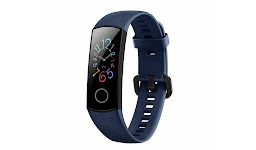
HONOR Band 5 Midnight Navy


In The Box

• HONOR Band 5 Midnight Navy

• Charging Cradle

• Charging Cable

• Quick Start Guide

• Warranty Card


COOL’s

• 0.95" AMOLED colour display

• 24/7 heart rate monitor

• Affordable fitness tracker

• Sleep tracker

• Up to 14 days battery life


SUCX’s

• Relatively thick on it's width

• Almost identical to HONOR Band 4

• Battery will drain faster if notification and sensors turn on

• Firmware update slow. Take about 20 minutes


URL: https://www.hihonor.com/global/products/wearables/honorband5/

Sunday, July 19, 2020

Securing Samsung Galaxy M31 With Caller ID and spam protection


FUNCTION: User know who's calling even the number not stored in contact list.

                     For spam and fraud call, user can block the call and reporting it.


1. Phone > More options (vertical 3 dots) > Settings


2. Caller ID and spam protection: Enable


3. Caller ID and spam protection

    I have read and acknowledge Hiya's Privacy Policy: Tick

    I have read and agree to Hiya's Terms of Service: Tick

    Agree


4. When receiving call from number not in contact list:

    Phone > Recents > Click on the number {03xxxxxxxx} > info ('i')


5. To block > Block > Block


6. To Report:

    Call type: Telemarketer

    OK


7. {03xxxxxxxx}

    Comment: Credit card

    Block all calls and messages from this number: Untick

    Report