Google

Tuesday, July 28, 2020

HONOR Band 5: Pair With iPhone X


PRE: For first time setup, follow steps 1 - 5 on HONOR Band 5: First Time Setup


1. App Store > Search 'Huawei Health' > GET > Install > Enter Apple ID Password > Sign In


2. OPEN > OK > OK > Allow


3. Huawei Health Notice: Agree


4. Enter existing HUAWEI ID or Follow steps 1 - 10 to Register new HUAWEI ID


5. Basic information

    Gender: Female

    Height: x cm

    Weight: x kg

    Birthday: dd Mmm yyyy

    Next


6. Agree


7. HealthKit Share > Let's go > Turn All Categories On > Allow


8. Agree


9. More Options (3 vertical dots) > Add > Smart Band > Honor Band 4 & 5


10. Select accessory: HONOR Band 5-A05


11. Pairing guide > Click 'Tick' on Band display

12. Bluetooth Pairing Request: Pair


13. Allow HONOR Band 5-A05 to display your iPhone notifications? Don't Allow


14. Firmware update > Auto-update device over Wi-Fi


15. Update: Update

      New version: 1.1.0.142

      x% Transfering...

      FINISH


16. Band will continue to update. Be patient. Once done, it'll restart.


17. Huawei Health > Devices > HONOR Band 5-A05 > Firnware update > Update

      New version: 1.1.0.152

      x% Transfering...

      FINISH


18. Band will continue to update. Be patient. Once done, it'll restart.


19. Huawei Health > Devices > HONOR Band 5-A05

      HUAWEI TruSleep > Enable > Enable

     Activity reminder: Disable

     Continuous heart rate monitoring: Enable > Monitoring mode: Smart > Back

     Heart rate limit interval and warning: Disable

     Alarm > Smart alarm: hh mm AM/PM > Smart wakeup: 10 minutes > Back > Repeat: Weekdays > Save

     Weather report: Disable

HONOR Band 5: First Time Setup


WARNING: Always wipe the charging port completely dry before connecting the charging cradle.


1. Insert the protruding part of charging cradle into the charging port on the band. A click sound signal the cradle position correctly.


2. Connect the charging cable micro hdmi into the cradle and USB port to power adapter or laptop.


3. The band will be automatically power on while being charged.


REMARK: Estimated about 100 minutes charging times required to fully charge the band at 25°C room temperature. Wait for battery icon to shown full level.


4. Follow steps 1 - 19 in HONOR Band 5: Pair With iPhone X to pair with iPhone X


5. To view battery level:


5.1 From Band:

      HOME > More > Battery


    OR


5.2 From 'Huawei Health' Apps:

      Huawei Health > Devices > HONOR Band 5-A05 (Battery level icon)

Sunday, July 26, 2020

Samsung Galaxy Note 4: Factory Data Reset


OPTION 1: When the phone is OFF


1. Shutdown phone


2. Press and hold Vol + button, Home button and Power button until "No Command" appear


3. Wipe data/ factory reset (Using Vol + button and Power button to select)


4. Yes

     Data wipe complete


5. Reboot system now


OPTION 2: When the phone is ON


6. Settings > Backup and reset > Factory data reset > DELETE ALL

Wednesday, July 22, 2020

Register HUAWEI ID from Huawei Health Apps


A. On Huawei Health


1. Huawei Health > Click 'Register' to register new HUAWEI ID


2. HUAWEI ID

    Select country/region: Malaysia

    AGREE


3. Set birthday: {dd Month yyyy} > Next


4. Register using phone number > Register using email


5. Register using email

    Email: {emailid@yahoo.com}

    Next


6. Set password

    Password: {password}

    Confirm password: {re-type password}

    Finish


7. Associate Security phone number

    Country/Region Malaysia

    +60{12xxxxxxx}

    Next


8. Verification code sent to +60 {12xxxxxxx}

    Enter verification code: {6-digit code}

    Next


B. On {emailid@yahoo.com} INBOX 


9. Click on 'Verify>' link inside email with title 'Verify Your Identity With Email Verification Code'


C. On Huawei Health


10. Click Verified

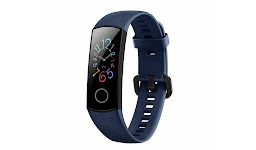
HONOR Band 5 Midnight Navy


In The Box

• HONOR Band 5 Midnight Navy

• Charging Cradle

• Charging Cable

• Quick Start Guide

• Warranty Card


COOL’s

• 0.95" AMOLED colour display

• 24/7 heart rate monitor

• Affordable fitness tracker

• Sleep tracker

• Up to 14 days battery life


SUCX’s

• Relatively thick on it's width

• Almost identical to HONOR Band 4

• Battery will drain faster if notification and sensors turn on

• Firmware update slow. Take about 20 minutes


URL: https://www.hihonor.com/global/products/wearables/honorband5/