Google

Saturday, November 20, 2021

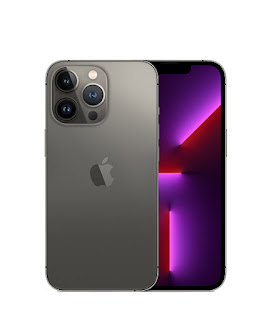
iPhone 13 Pro: Graphite 128GB


In The Box

• iPhone 13 Pro Graphite 128GB
• USB-C to Lightning Cable
• SIM Ejector Tool
• Documentation

COOL’s
• 6.1" Super Retina XDR Display with ProMotion with adaptive refresh rates up to 120Hz
• IP68 Splash, Water and Dust Resistant
• A15 Bionic Chip
• Pro 12MP TrueDepth Camera
• 4K video recording up to 60 fps
• Face ID
• Fast charge up to 50% charge within 30 minutes with at least 20W adapter
• iOS 15

SUCX’s
• Pricey
• MagSafe wireless charging up to 15W
• NO power adapter and Earpod
• Full body phone and back camera protector is a MUST
• No support for external storage

URL: https://www.apple.com/my/iphone-13-pro/

Saturday, July 17, 2021

SAMSUNG Galaxy Tab A7: Remove Weather Widget


1. Press and hold on Weather icon on Home screen

2. Remove

Securing SAMSUNG Galaxy Tab A7 With Avast Mobile Security


1. Play Store > Search for 'Avast Mobile Security'

2. Avast Antivirus - Scan & Remove Virus, Cleaner > Install

3. Open

4. SCAN NOW

5. Allow Avast Mobile Security to access photos, media and files on your device?: Allow

6. Continue with free > CONTINUE AS FREE

7. Scan Wi-Fi > Allow Avast Mobile Security to access this device's location?: While using the app

8. Boost RAM > GRANT PERMISSION > Avast Mobile Security > Allow usage tracking: ON

9. Clean junk > No junk to clean now > <-

10. Settings > Protection
    Web Shield: Enable > AGREE > GO TO SETTINGS > Installed services > Avast Mobile Security > On > Allow

11. HOME > SCAN > CONTINUE > KEEP BASIC SECURITY

12. Automatic Wi-Fi scanning disabled: ACTIVATE

13. Activate Daily scan: ACTIVATE
      Scan time: 03:30 > OK
      <-

SAMSUNG Galaxy Tab A7: Uninstall/ Disable Unwanted Apps

  
A. If the Apps come with Uninstall option:
 
1. Settings > Apps > [Google Play Movies & TV]

2. Uninstall > OK
 
B. If the Apps come with Disable option:

1. Settings > Apps > [Netflix]

2. Disable > Disable app 

SAMSUNG Galaxy Tab A7: Clear Gmail Apps Data


1. Settings > Accounts and backup > Manage accounts > [id@gmail.com]

2. Sync account > Toggle OFF:
    People details
    Contacts
    Google Play Movies & TV
    Calendar
    Drive
    Gmail


3. Settings > Apps > Gmail > Storage

4. Clear data > OK