
WARNING: Always perform backup on all the data on your mobile phone using Nokia PC Suite before attempt to install the software. The author will NOT be held responsibility under any circumstances.
1) Download the following softwares:
1.1 Garmin Mobile XT for Symbian S60 3rd Edition Ver. 5.00.50
URL: http://www.garmin.com/software/GarminMobileXTforSymbianS603rdEdition_50050.exe
1.2 Garmin Mobile XT Free Basemap Ver. 4.xx.xx
URL: http://www.garmin.com/software/GarminMobileXTFreeBasemap_4xxxx.exe
1.3 Garmin Mobile XT Support Files Ver. 4.xx.xx
URL: http://www.garmin.com/software/GarminMobileXTSupportFiles_4xxxx.exe
1.4 Garmin Mobile XT keygen v1.5 2008 (Use at your own risk)
1.5 MFM MFM-Garmin 101011 (11 Oct 2010)
URL: http://www.1gps.com.my/download/garmin.aspx
2) Connect the phone to PC via USB cable. Select 'Mass storage' Mode.
3) From PC, install in the following sequence:
3.1 Garmin Mobile XT for Symbian S60 3rd Edition
3.2 Garmin Mobile XT Free Basemap
3.3 Garmin Mobile XT Support Files
4) Double click on 'GarminMobileXTforSymbianS603rdEdition_50050.exe'.
1.1 Garmin Mobile XT for Symbian S60 3rd Edition Ver. 5.00.50
URL: http://www.garmin.com/software/GarminMobileXTforSymbianS603rdEdition_50050.exe
1.2 Garmin Mobile XT Free Basemap Ver. 4.xx.xx
URL: http://www.garmin.com/software/GarminMobileXTFreeBasemap_4xxxx.exe
1.3 Garmin Mobile XT Support Files Ver. 4.xx.xx
URL: http://www.garmin.com/software/GarminMobileXTSupportFiles_4xxxx.exe
1.4 Garmin Mobile XT keygen v1.5 2008 (Use at your own risk)
1.5 MFM MFM-Garmin 101011 (11 Oct 2010)
URL: http://www.1gps.com.my/download/garmin.aspx
2) Connect the phone to PC via USB cable. Select 'Mass storage' Mode.
3) From PC, install in the following sequence:
3.1 Garmin Mobile XT for Symbian S60 3rd Edition
3.2 Garmin Mobile XT Free Basemap
3.3 Garmin Mobile XT Support Files
4) Double click on 'GarminMobileXTforSymbianS603rdEdition_50050.exe'.
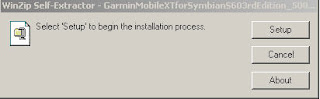
Click 'Setup'
 Select the hand phone Removable Drive, than click Install; i.e: 'Removable Drive F:'
 Click 'Done'
5) Double click on 'GarminMobileXTFreeBasemap_4xxxx.exe'.

Click 'Setup'.
 Select the hand phone Removable Drive, than click Install.
 Click Done
6) Double click on 'GarminMobileXTSupportFiles_4xxxx.exe'.
 Click 'Setup'.
  Select the hand phone Removable Drive, than click Install.
 Files copying in progress...
 Click Done
7) Remove USB connection. Do NOT click on 'LAUNCH' Garmin Mobile if prompted.
8) Launch Garmin Mobile XT from the handphone. Make sure the phone USB cable is dismantle from your PC.
9) For 1st time access, select the following (use jog left or right):
Text Language: English > Next
Voice language: English > Next
Units: Metric > Next
Online Access: Disabled > OK
Select ‘I Agree’
10) Choose 'Connect to A garmin GPS' > Click 'Cancel'.
11) Select Tools > Settings > About. Write down the Card ID.
12) Exit Garmin Mobile XT application.
13) Generate unlock code using Garmin Unlock Generator v1.3. Enter the previous copy Card ID in the 'Enter your Unit ID here:' field. Click top 'Generate' button.

14) Copy the unlock code on 'Your GM XT device unlock code:' field and paste into notepad. Save as sw.unl. Choose All Files option for Save as type:.
15) Copy sw.unl into Garmin folder on handphone in 'Mass storage' Mode.
16) Install the MFM-Garmin-101011.exe.
15) Copy sw.unl into Garmin folder on handphone in 'Mass storage' Mode.
16) Install the MFM-Garmin-101011.exe.
 Select English > OK
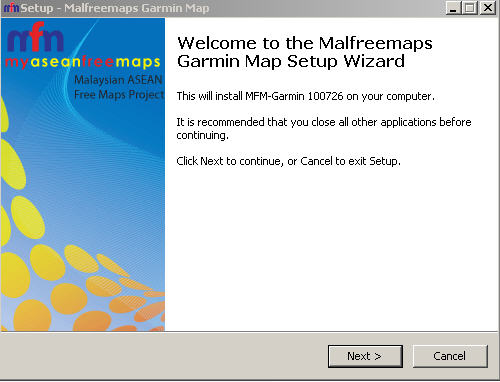 Click Next >
  Select 'I accept the agreement' > Next >
 Use the default for Select Destination Location > Next >
 Select Custom Polygons... > Next >
 Click Install
 Installing...
 Click Yes on 'Do you wish to create a gmapsupp.img?'
  Click Generate Map
 Click Yes on 'Proceed to generate gmapsupp.img with above options?'
 Click Yes. Select Garmin folder on handphone
 Click OK
 Click Finish.
REMARK: Make sure the file gmapsupp.img is stored in handphone Garmin folder.
17) Remove USB connection. Do NOT click on 'LAUNCH' Garmin Mobile if prompted.
18) Re-launch Garmin Mobile XT. Click Tools > Settings > System > Remote GPS > Use Attached /Built-in GPS. Click Enable > Done.
19) Your Garmin Mobile XT is successfully installed.
17) Remove USB connection. Do NOT click on 'LAUNCH' Garmin Mobile if prompted.
18) Re-launch Garmin Mobile XT. Click Tools > Settings > System > Remote GPS > Use Attached /Built-in GPS. Click Enable > Done.
19) Your Garmin Mobile XT is successfully installed.


