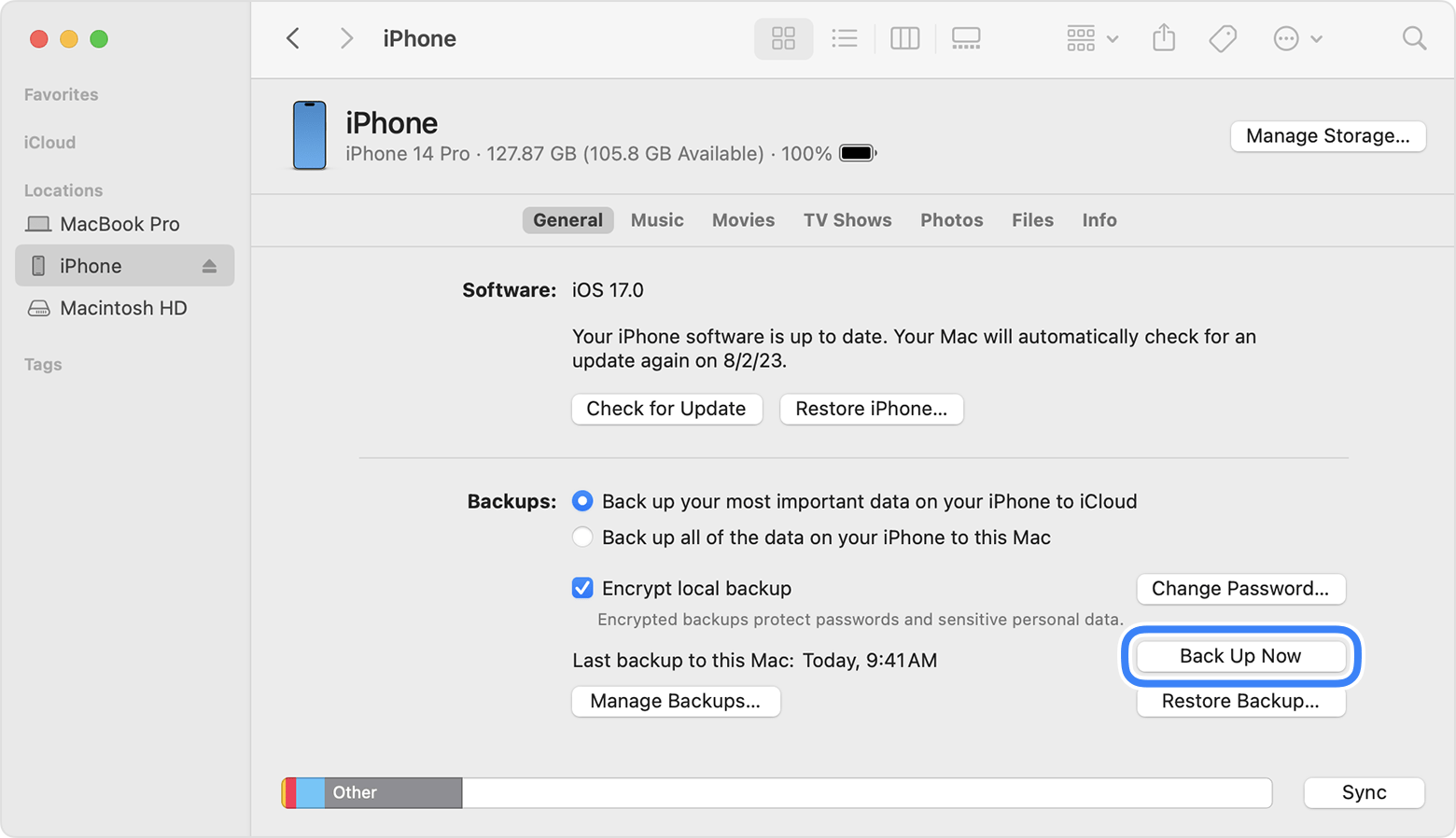
REMARK: For macOS 10.15 or later, use Finder to backup
For macOS earlier than 10.15, use iTunes to backup
1. Connect iPhone 13 Pro and MacBook Air using USB-C to Lightning Cable.
2. On iPhone:
. Trust This Computer? > Trust
. Enter Passcode > [passcode]
3. On MacBook Air:
'Software Update: A software update is required to connect to [iPhone_name] iPhone'. > Install
4. Installing 1 item
5. Finder sidebar > Click [iPhone_name]
6. On right hand side, click General tab
. Select 'Back up all of the data on your iPhone to this Mac' > Back Up Now
7. When Back Up completed:
Last backup on this Mac: Today, [h:mm AM/PM]
8. Under 'General' tab, click 'Manage Backups' to view all Back Up.
URL: https://support.apple.com/en-my/guide/iphone/iph3ecf67d29/ios
