Google

Saturday, February 27, 2021

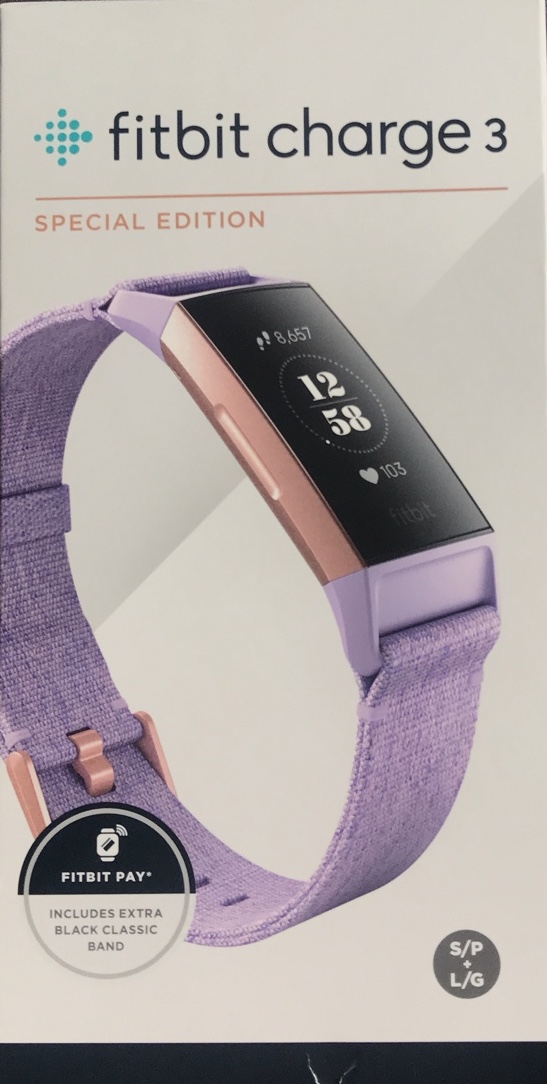
fitbit charge 3 SPECIAL EDITION: Lavender Woven Rose Gold


In The Box
• Fitbit Charge 3 Rose Gold case in Lavender Woven Band (LARGE + SMALL)
• Additional detachable (LARGE + SMALL) Black Classic Band
• USB charging cradle cable
• Safety Instructions & Limited Warranty

COOL’s
• OLED vertical 1.57" large display
• 24/7 heart rate tracking
• Cardio Fitness Score
• All-Day Calorie Burn
• 20+ Goal-Based Exercise Modes
• Female Health Tracking
• SmartTrack Automatic Exercise Recognition
• Built-in NFC
• Real-Time Pace & Distance using Phone GPS
• 50M waterproof
• Up to 7 days battery life
• Voted 2018 Fitness Tracker of the Year by Wareable

 SUCX’s
• Sometimes touchscreen was a bit unresponsive
• Battery will drain faster if notification and sensors turn on
• Firmware update slow. Up to 30 minutes.
• Minima bank support for Fitbit Pay
• Unable to update firmware if device battery less than 50% even charger plug-in

URL: https://www.fitbit.com/global/de/products/trackers/charge3

Saturday, January 23, 2021

Samsung M31: Upgrade to One UI 3 (Android 11)


WARNING: Before perform firmware update, always perform phone backup! The author will NOT be held responsibility under any circumstances.

1. Settings > Software update > Download and install > Download


2. Downloading update...


3. Install now


4. Android system update > Reboot > Update (%) > Reboot


5. Phone is updating... Optimising app x of y > Optimising storage


6. Login to the phone > Finishing system update...


7. Software update > OK


URL: https://news.samsung.com/global/samsung-one-ui-3-takes-user-experience-to-new-heights-with-android-11

Sunday, October 4, 2020

Samsung Galaxy M31: Add Chinese Input Language to Samsung Keyboard


1. Settings > General Management > Language and input > On-screen keyboard

2. Samsung Keyboard > Languages and types > Manage input languages

3. Auto update language data?: Whenever available

4. Toggle on 'Chinese (CN)' > Back (<)

5. Languages and types: Language switching method

6. Select 'Language key and space bar swipe'

7. To switch languages, select globe icon located on keyboard or swipe the space bar.

Thursday, August 20, 2020

Samsung Galaxy M31 as Document Scanner


1. Camera app > Setting: 

    Scene optimiser: Enable

    Document scan: Enable


2. To scan:


2.1 Camera app > point to document


2.2 Yellow rectangle box with 'Scan' button will appear


2.3 Press 'Scan' button to scan


2.4 Scan document stored phone Gallery

Sunday, August 2, 2020

Samsung Galaxy M31 Mirror Screen with Samsung 55' 7 Series Smart TV


A. Samsung M31


1. Pull down extended notification menu using 2 fingers > Smart View


2. Phone -> Other device

    Click on '[TV] Samsung 7 Series (55)'

    Start now


B. Samsung Samsung 7 Series TV


3. Allow


C. To disconnect, on Samsung M31:


4. Click on Smart View icon > Disconnect


URL: https://www.samsung.com/my/support/tv-audio-video/screen-mirroring-smartphone-view-on-tv/