Google

Sunday, June 16, 2024

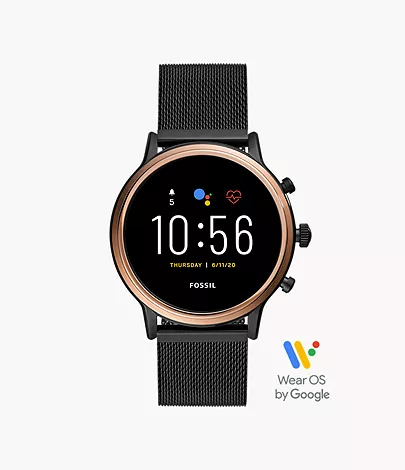
FOSSIL SMARTWATCHES Gen 5 Smartwatch Julianna HR Smoke Stainless Steel

 Gen 5 Smartwatch Julianna HR Smoke Stainless Steel Gen 5 Smartwatch Julianna HR Smoke Stainless Steel

Model: FTW6036
Color: Gold Black Silicon


In The Box
• Fossil Gen 5 Smartwatch Julianna HR FTW6036
• USB cable with magnetic charger
• Quick Start Guide
• Fossil Warranty and Information

COOL’s
• 3.2 cm AMOLED / 416 x 416 / 328ppi
• Qualcomm Snapdragon Wear 3100 Processor
• 2 Additional Push Buttons (configurable)
• Accelerometer, Altimeter, Ambient Light, Compass, Gyroscope, Off-body IR, PPG Heart Rate sensor
• Stylish mesh band

SUCX’s
• Relatively pricey
• Bloatware
• Battery 24 hours, will drain faster if more features enable
• Firmware update slow.

URL: https://www.fossil.com/en-au/products/gen-5-smartwatch-julianna-hr-smoke-stainless-steel-/FTW6036.html

Friday, June 14, 2024

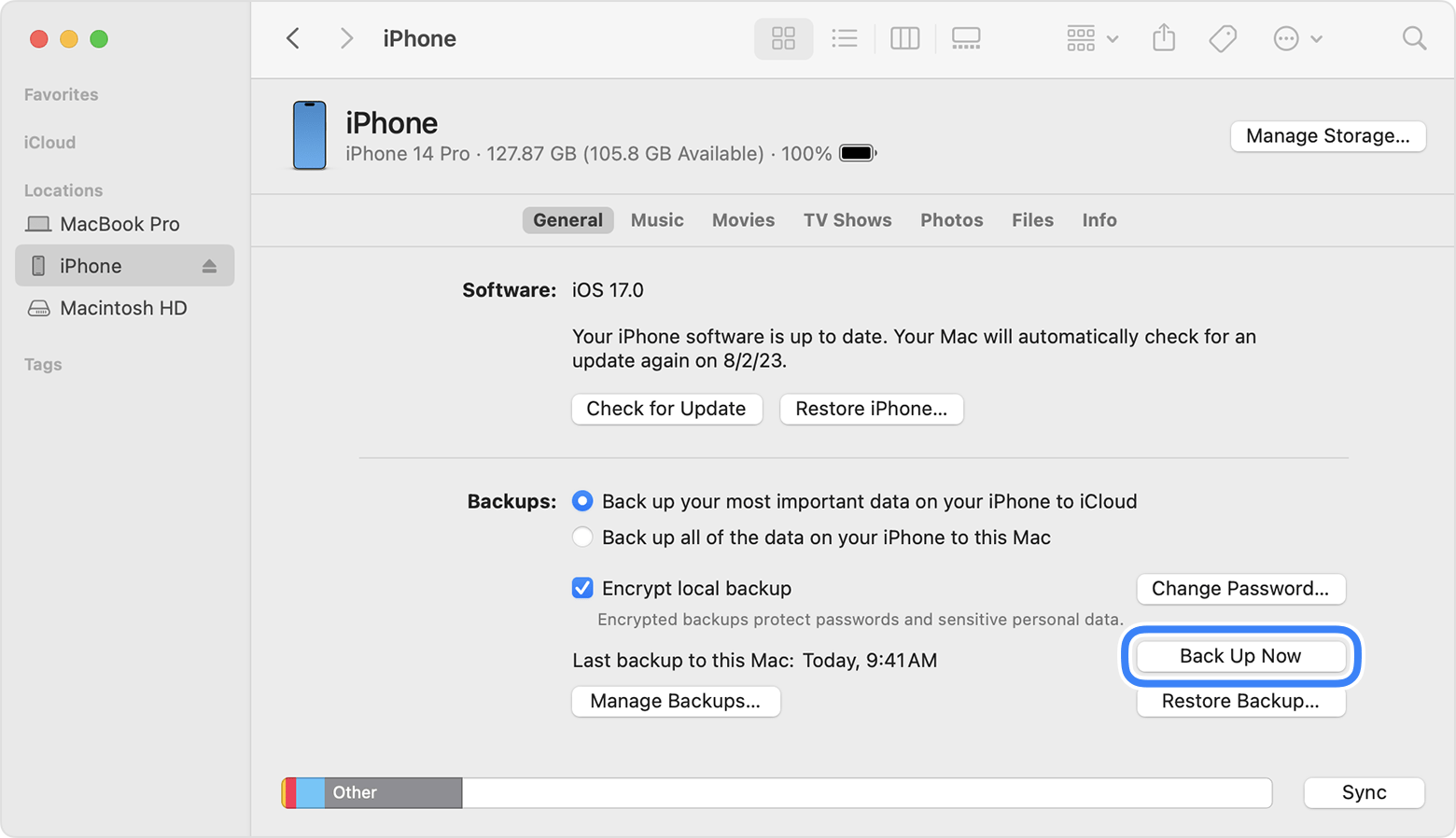
Back Up iPhone 13 Pro to MacBook Air

A Finder window showing the Back Up Now button 

REMARK: For macOS 10.15 or later, use Finder to backup
                   For macOS earlier than 10.15, use iTunes to backup

1. Connect iPhone 13 Pro and MacBook Air using USB-C to Lightning Cable.

2. On iPhone:
    . Trust This Computer? > Trust
    . Enter Passcode > [passcode]

3. On MacBook Air:
    'Software Update: A software update is required to connect to [iPhone_name] iPhone'. > Install

4. Installing 1 item

5. Finder sidebar > Click [iPhone_name]

6. On right hand side, click General tab
   . Select 'Back up all of the data on your iPhone to this Mac' > Back Up Now

7. When Back Up completed:
    Last backup on this Mac: Today, [h:mm AM/PM]

8. Under 'General' tab, click 'Manage Backups' to view all Back Up.

URL: https://support.apple.com/en-my/guide/iphone/iph3ecf67d29/ios

Sunday, December 17, 2023

iPad Air 64GB (4th Generation) Wi-Fi: Pair with Apple Pencil (2nd generation)


PRE-PAIRING:
@ Update iPadOS to the latest
@ Apple Pencil compatible with iPad Air
@ Apple Pencil charged, with battery 50% or more
 

1. Attach Apple Pencil on right hand side of iPad  magnetic connector

2. Welcome to Apple Pencil > Continue

3. Try Scribble > Continue

4. Explore Double Tap > Done

URL: https://support.apple.com/en-my/HT205236

Charging Apple Pencil (2nd generation)

1. Attach Apple Pencil on right hand side of iPad  magnetic connector

2. Swipe left on iPad  Home Screen

3. Look for Apple Pencil icon for current battery level


Saturday, December 16, 2023

iPad Air 64GB (4th Generation) Wi-Fi: Software Update


1. Settings > General > Software Update

2. Software Update:
    iPadOS 17.2
    Download and Install

3. Enter Passcode:
    Enter your passcode: [passcode]

4. Terms and Conditions: Agree

5. About xx minutes remaining > Preparing Update...

6. Software Update: Install Now

7. Verifying update...

8. iPad will be reboot for update to complete

9. Swipe up to open

10. Enter Passcode: [passcode]

11. Software Update Complete: Your iPad has been updated to iPadOS 17.2 > Continue

12. Apple Pay: Set Up Later

13. iPad Analytics: Don't Share

14. Welcome to iPad > Get Started

15. Settings > Finish Setting Up Your iPad > Set Up Apple Pay

16. Apple Pay: Set Up Later

URL: https://www.apple.com/my/ipados/ipados-17/